
Over time, many of us log in to different apps, games, and websites using our Facebook account. It may be convenient at first, but later you might want to remove access from apps you no longer use.
In this guide, I’ll show you how to unlink or remove connected apps and websites from your Facebook account step by step.
Why You Should Remove Connected Apps From Facebook
When you use Facebook to log in to an app or website, that app may stay connected to your account for years. Some apps may still have access to certain information, depending on the permissions you allowed. Removing old or unused apps can help keep your Facebook account cleaner, safer, and more private.
Get 20% discount on your hosting plan.
How to Remove Connected Apps and Websites From Facebook
First, open your Facebook account. Tap the three lines menu at the top corner of the screen. This will open your Facebook menu. Next, scroll down and tap Settings & Privacy.
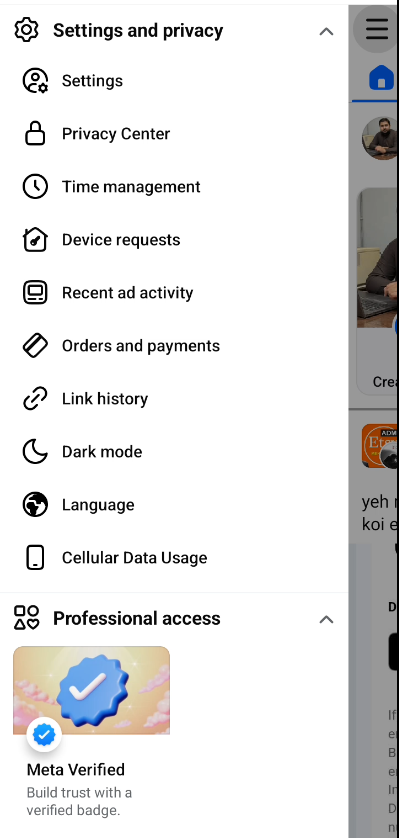
After that, tap Settings. Now scroll down until you find the section called Your Activity. Under this section, look for Apps and Websites and tap on it.
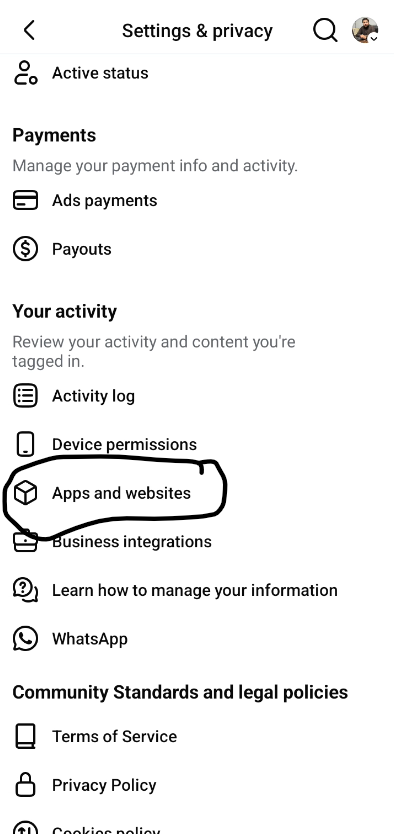
Here, Facebook will show you a list of all the apps, games, and websites connected to your account. You may see apps that were connected years ago, even from 2016 or 2017.
To remove one, simply tap on the app or website you want to unlink. Once it opens, look for the Remove button. Tap Remove, then confirm your choice.
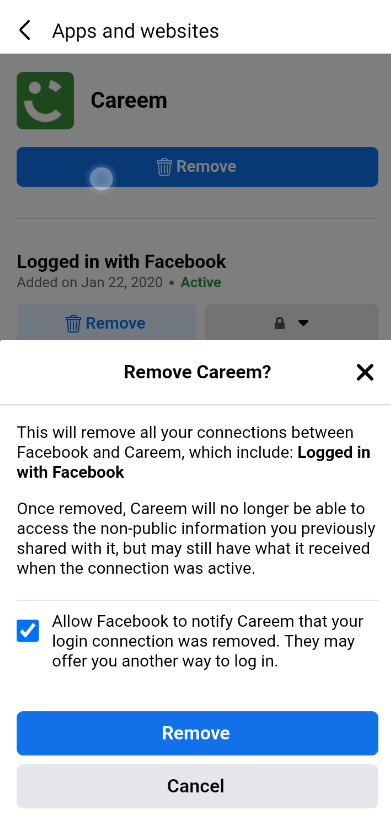
That app or website will now be removed from your Facebook account.
Also read: Understanding the Relationship Between HTML, CSS, and JavaScript
Final Thoughts
That’s how you can easily unlink apps, games, or websites from your Facebook account. This is a simple way to clean up your account and remove access from apps you no longer use.
I hope this guide helped you learn something new. If it did, make sure to subscribe to the channel and share this with anyone who might need it. If you’re watching on TikTok or Facebook, don’t forget to follow the profile.