
If you have ever reacted to a Facebook post by mistake, left a comment you want to change, or watched a video that you want to remove from your Facebook watch history, you can manage all of this through your Facebook Activity Log.
Facebook keeps a record of many actions you take on the platform, including your reactions, comments, posts, and videos you have watched. The good news is that you can easily access this information and update or delete certain activity whenever needed.
In this guide, I will show you how to access your Facebook Activity Log, manage your reactions and comments, and delete videos from your Facebook watch history.
What Is the Facebook Activity Log?
Your Facebook Activity Log is a private section of your profile where you can review and manage your activity on Facebook. This includes things like posts you have interacted with, comments you have made, reactions you have added, and videos you have watched.
This feature is helpful if your feed refreshes and you lose a post you just reacted to, or if you want to clean up your watch history.
How to Access Your Facebook Activity Log
To find your Facebook Activity Log, follow these steps:
First, open Facebook and log in to your account. Then go to your Facebook profile. Once you are on your profile page, tap the three dots in the top-right area of the page.
From there, you should see an option called Activity Log. Tap on it to open your activity settings.
Once the Activity Log opens, scroll down until you see the section labeled Your Facebook Activity. This is where you can manage different types of activity connected to your account.
Also Read: How to Unlink Apps and Websites From Your Facebook Account
How to Manage Facebook Reactions and Comments
If you accidentally liked, loved, or reacted to a Facebook post, you can remove or change that reaction from your Activity Log.
Inside the Activity Log, go to Your Facebook Activity and look for the section related to Comments and Reactions. Then tap Manage Comments and Reactions.
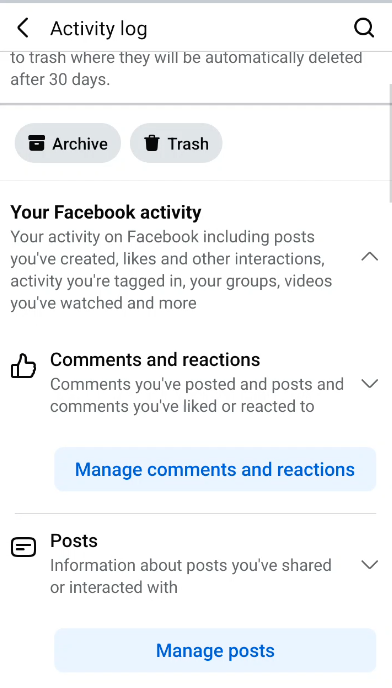
After a moment, Facebook will show you a list of your recent reactions and comments. From here, you can select the reaction or comment you want to update.
If you want to remove a reaction, simply tap on the item and choose the option to remove or update it. Once you remove the reaction and refresh the original post, your reaction should no longer appear there.
You can use the same method to find and manage comments you have made on Facebook posts.
Get 20% discount on your hosting.
How to Find Your Facebook Watch History
You can also use the Activity Log to view videos you have watched on Facebook.
To do this, go back to your Facebook profile, tap the three dots, and open Activity Log again. Then scroll down to Your Facebook Activity.
From there, go to the posts or activity section and tap the option to manage your posts or activity. If needed, use the filter option to narrow down the results.
Tap Filters, then go to Categories. Instead of viewing all activity, choose Videos You’ve Watched. Facebook will then show you a list of videos you have watched.
How to Delete Videos From Facebook Watch History
Once you are viewing your Facebook watch history, you can remove individual videos from the list.
Find the video you want to delete, tap the three dots next to it, and choose Delete. After you delete it, that video will be removed from your Facebook watch history.
This is a simple way to clean up your history, remove videos you do not want saved, or manage your privacy on Facebook.
Why Managing Your Facebook Activity Log Is Useful
Knowing how to use your Facebook Activity Log gives you more control over your account. You can correct mistakes, remove unwanted reactions, delete old comments, and clear videos from your watch history.
This is especially useful if you accidentally reacted to a post, lost a video after your feed refreshed, or simply want to keep your Facebook activity more organized.
Final Thoughts
The Facebook Activity Log is one of the easiest ways to manage your reactions, comments, posts, and watch history. Whether you want to remove a mistaken reaction, edit a comment, or delete a video from your Facebook watch history, everything can be done from your profile settings.
All you need to do is open your Facebook profile, go to the three-dot menu, select Activity Log, and choose the activity you want to manage.
By using this feature, you can keep your Facebook profile cleaner, more private, and better organized.