
Most Instagram users don’t realize just how much control they have over their activity on the platform. From the posts you’ve liked to the videos you’ve watched, Instagram stores a detailed history of everything you do — and it also lets you clean it all up whenever you want.
In this guide, we’ll walk you through four things: how to manage your likes, how to manage your comments, how to check and clear your watch history, and how to delete your posts in bulk. Let’s get into it.
Get 20% discount on your hosting plan.
Getting Started: How to Access Your Activity
No matter what you want to manage, everything starts from the same place. Here’s how to get there:
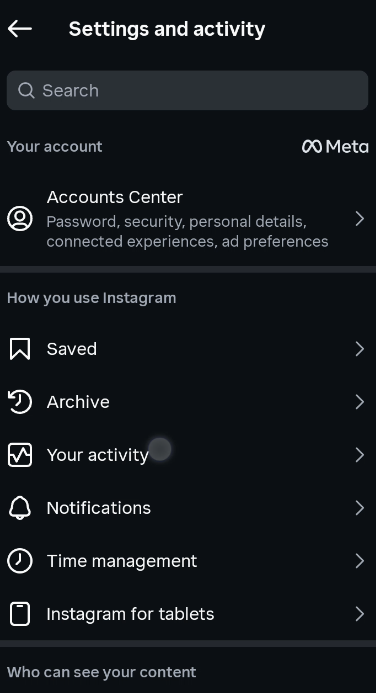
Tap your profile icon in the bottom right corner of the Instagram app. Then tap the three horizontal lines in the top right corner to open the side menu. From there, tap Your Activity (sometimes labeled as “How You Use Instagram”). This is your central hub for managing everything we’ll cover in this guide.
1. How to Check and Manage Your Likes
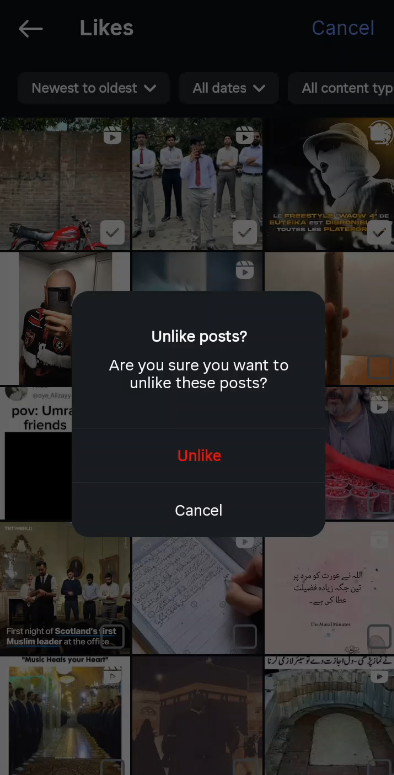
Inside Your Activity, tap on the Interactions section, then tap Likes. You’ll see a full list of every post you’ve liked on Instagram, all the way back to when you started using the app.
To unlike any posts, tap Select in the top right corner. Choose one or multiple posts you want to remove, then tap Unlike, and confirm by tapping Unlike Post. Those posts will be instantly removed from your liked history.
2. How to Check and Delete Your Comments
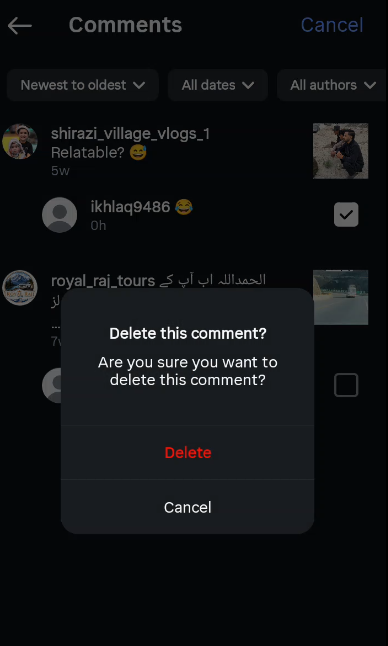
Still inside the Interactions section, tap on Comments. This will show you every comment you’ve ever left on Instagram — on any post or video.
To delete a comment, tap Select, choose the comment you want to remove, and tap Delete. The comment will be removed from both your activity history and the original post itself. This is especially useful if you want to clean up old or irrelevant comments you’ve left in the past.
3. How to Check and Clear Your Watch History
Back in the Your Activity section, scroll down until you see Watch History and tap on it. Here you’ll find a complete list of every video you’ve watched on Instagram.
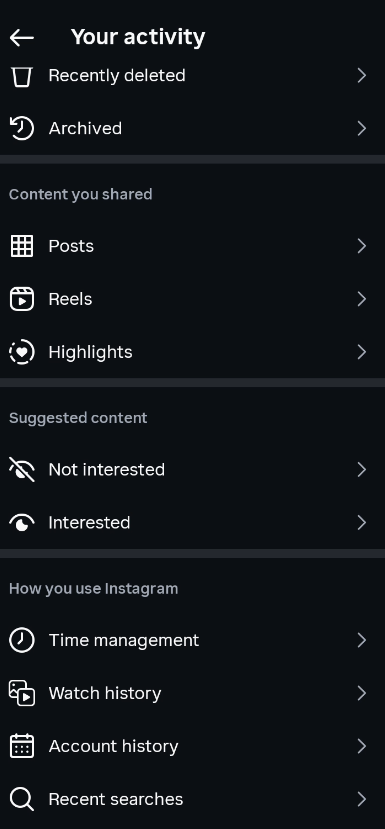
To remove videos from your watch history, tap Select, then choose individual videos or tap Select All if you want to clear everything at once. Once selected, tap Remove, then confirm by tapping Remove again. Those videos will be wiped from your history immediately.
4. How to Delete Instagram Posts in Bulk
This one is a real time-saver if you’re looking to clean up your profile. From the Your Activity section, scroll down to Content You’ve Shared and tap on Posts. You’ll see all the posts you’ve ever published on your profile.
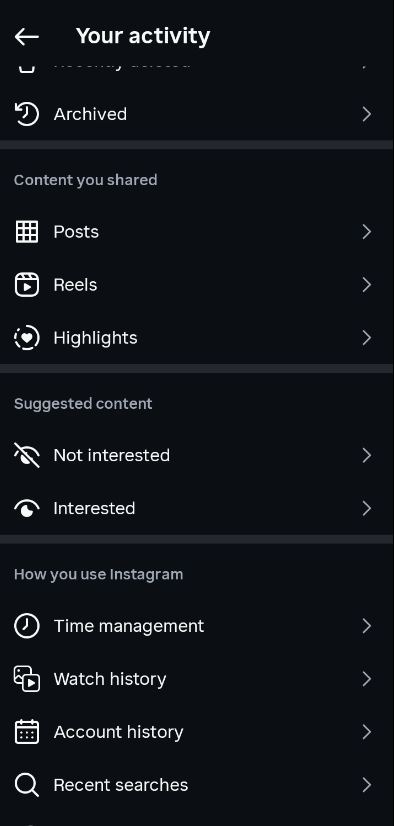
To delete them in bulk, tap Select, choose all the posts you want to remove, then tap Delete and confirm by tapping Delete again. The selected posts will be permanently removed from your profile.
The same process applies to Reels — just tap on Reels instead of Posts and follow the same steps.
What If You Delete Something by Mistake?
Don’t panic. Instagram has a safety net called Recently Deleted. If you accidentally delete a post or reel, you can go back to the Your Activity section, tap Recently Deleted, and restore it — but only within the time limit Instagram sets, so don’t wait too long.
Also read: How to Unlink Apps and Websites From Your Facebook Account
Final Thoughts
Instagram gives you a surprising amount of control over your activity, and most people never even know these features exist. Whether you want to unlike old posts, remove comments, clear your watch history, or declutter your profile by deleting posts in bulk, it’s all available in one place under Your Activity. Take a few minutes to explore it and keep your Instagram presence exactly the way you want it.
Frequently Asked Questions (FAQs)
1. Can I see everything I’ve liked on Instagram?
Yes. Go to Your Activity → Interactions → Likes. You’ll find a complete history of every post you’ve liked on the platform.
2. Will deleting a comment from my activity also remove it from the post?
Yes. When you delete a comment through Your Activity, it gets removed from your history and from the original post at the same time.
3. Does clearing my Instagram watch history affect my recommendations?
Clearing your watch history may reset some of Instagram’s content suggestions since the algorithm uses your viewing behavior to personalize your feed.
4. Can I recover a post after deleting it in bulk?
Yes, but only within a limited time. Deleted posts go to the Recently Deleted folder, where you can restore them within the timeframe Instagram allows (usually up to 30 days).
5. Can I delete Instagram Reels in bulk the same way?
Absolutely. The process is identical — go to Your Activity → Content You’ve Shared → Reels, select the ones you want to remove, and delete them.
6. Is there a limit to how many posts or likes I can remove at once?
Instagram doesn’t officially state a hard limit, but it’s a good idea to delete in batches to avoid any temporary restrictions on your account activity.
7. Does Instagram notify anyone when I unlike a post or delete a comment?
No. Instagram does not send notifications when you unlike a post or delete a comment, so you can manage your activity without anyone knowing.